Every time we type a message, write a document, or search for information online, we interact with a design that has survived more than a century of technological change. The keyboard may seem like a simple computer accessory, but its familiar arrangement of letters reflects a long history of mechanical invention, commercial competition, and changing computing needs.
The keyboard history we know today began long before personal computers became household devices. Early inventors experimented with mechanical writing machines, manufacturers competed to establish practical typing systems, and computer engineers adapted existing designs to work with electronic equipment. Eventually, the QWERTY layout became the dominant arrangement for English-language keyboards, appearing on everything from office computers to laptops and smartphones.
But how did QWERTY become so widely accepted? Why do the letters appear in an arrangement that does not follow the alphabet? And what role did manufacturers such as IBM play in shaping the modern keyboard?
Understanding the answers reveals how an invention designed for mechanical writing became an essential part of digital communication.
Typewriter Origins: Where Keyboard History Began
The story of the modern keyboard begins in the nineteenth century, when inventors were searching for ways to produce written documents more quickly and consistently than handwriting allowed.
Before typewriters became commercially successful, preparing a large volume of written material required considerable time and effort. Businesses, government offices, newspapers, and professional writers needed faster ways to produce letters, records, and reports.
Several inventors experimented with mechanical devices that could transfer characters onto paper. These early machines differed significantly in construction, and many were difficult to operate or unsuitable for widespread commercial use.
Early Experiments With Mechanical Writing
One important early invention was the machine developed by Pellegrino Turri around the beginning of the nineteenth century. Although details of its construction and operation are limited, it is associated with early attempts to create a writing machine that could help people who were blind.
Other inventors developed their own mechanisms for producing letters mechanically. These experiments established an important idea: a person could operate a machine to create standardized text rather than form every character by hand.
However, building a working writing machine was only part of the challenge. Inventors also needed to develop a practical method for selecting characters, controlling the mechanism, and moving the paper as text was produced.
The layout of the keys played a crucial role in how efficiently and comfortably people could use the machine.
Christopher Latham Sholes and the Practical Typewriter
A major turning point came with Christopher Latham Sholes, an American inventor who worked with collaborators to develop a commercially viable typewriter during the 1860s and 1870s.
Sholes experimented with different keyboard arrangements and mechanical designs. His work eventually led to a typewriter that attracted commercial interest and was licensed to the Remington company.
In 1874, Remington began selling the Sholes and Glidden typewriter, often recognized as the first commercially successful typewriter.
<AsyncImageGroup query={[“1874 Sholes Glidden Remington first commercial typewriter historical photograph”,”antique Remington typewriter nineteenth century keyboard close up”]} aspectRatio=”5:4″ layout=”bento” size=”lg”/>
The machine used a keyboard that would look unfamiliar in several respects to modern users, but its commercial success helped establish the typewriter as a practical office tool.
Remington already had experience manufacturing mechanical equipment, including sewing machines. Its manufacturing capabilities and commercial distribution helped bring the typewriter to a broader market.
As businesses adopted the technology, typing became a valuable professional skill. The growing demand for trained typists encouraged manufacturers to improve their machines and made keyboard familiarity increasingly important.
This was the environment in which the modern QWERTY arrangement developed.
QWERTY History: How the Familiar Layout Emerged
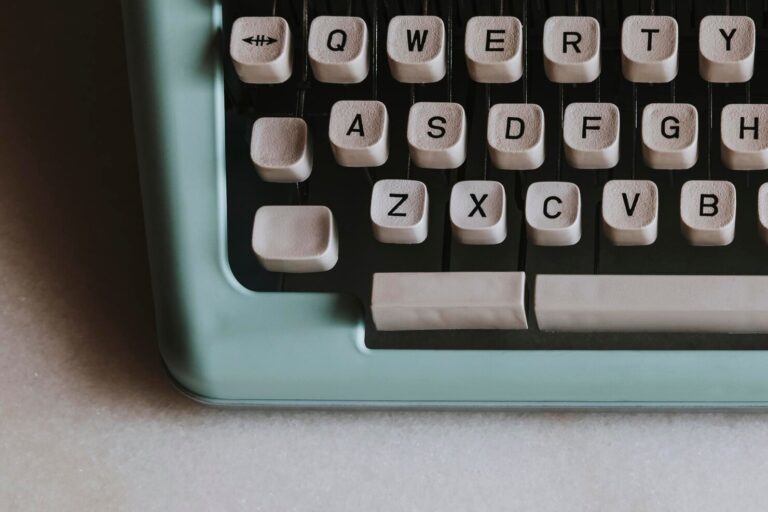
The word QWERTY comes from the first six letters on the upper alphabetic row of a standard English-language keyboard. Although the arrangement may appear arbitrary, it developed through a series of experiments during the early typewriter era.
The layout is closely associated with Christopher Latham Sholes and the early typewriters manufactured by Remington. However, the arrangement did not emerge as a perfect design in a single moment. It evolved as inventors worked to make mechanical typing practical.
Why Are the Letters Arranged This Way?
Early typewriters used mechanical components that moved when a typist pressed a key. Depending on the machine’s design, rapidly striking certain combinations of keys could cause typebars to interfere with one another.
Sholes and his collaborators revised the keyboard arrangement as they improved the machine. The QWERTY layout emerged through this development process and was used on commercially successful Remington typewriters in the 1870s.
A popular explanation claims that QWERTY was deliberately designed to slow typists down so the mechanisms would not jam. This explanation is often repeated, but it oversimplifies the historical evidence.
Mechanical limitations influenced early typewriter design, and key placement was part of the engineering challenge. Nevertheless, it is difficult to support the claim that the sole purpose of QWERTY was to make people type more slowly.
The more useful explanation is that the layout developed within the practical constraints of early machines and then benefited from commercial adoption.
The Role of Touch Typing
As typewriters became more common, typing instruction developed alongside them.
Training methods encouraged typists to use particular fingers for particular keys instead of searching for every letter individually. This approach, known as touch typing, made it possible to type without constantly looking down at the keyboard.
The QWERTY arrangement became increasingly embedded in typing education. Employers hired trained typists, schools taught established methods, and businesses invested in machines compatible with familiar keyboard layouts.
These developments created a powerful cycle: the more people learned QWERTY, the more attractive it became for manufacturers to continue supporting it.
Why QWERTY Became Difficult to Replace
By the late nineteenth and early twentieth centuries, QWERTY had gained an important advantage: familiarity.
A company considering a new typewriter wanted employees to use it without extensive retraining. A typist who had learned QWERTY wanted a new machine that supported existing skills. Training schools had little reason to teach a different layout if employers continued to use QWERTY machines.
This is an example of path dependence. An initial decision can shape later developments as individuals, companies, and organizations gradually adapt their methods and routines to follow the established approach.
Once QWERTY became established, changing the layout involved more than designing a potentially better arrangement. It also meant changing training materials, habits, equipment, and workplace expectations.
Alternative layouts appeared, including the Dvorak Simplified Keyboard, introduced in the 1930s. Advocates promoted alternative arrangements as potentially more comfortable or efficient for certain typing tasks. However, they faced the challenge of competing against a layout already supported by an extensive user base.
QWERTY’s success was therefore not simply a matter of technical superiority. Manufacturing, education, compatibility, and habit all helped maintain its position.
Early Computer Keyboards: From Typewriters to Digital Input
As electronic computers emerged, engineers began developing practical and dependable methods for users to interact with these machines.
Early computers did not necessarily use the keyboard-and-screen arrangement familiar today. Some relied on punched cards, paper tape, switches, or other input methods. These approaches were useful for particular computing tasks, but they did not offer the same immediate interaction that later became common with computer terminals.
The transition toward keyboard-based computing drew heavily on existing communication and typewriting technologies.
Teletype Machines and Computer Terminals
Teleprinters, such as Teletype machines, played a key role in connecting conventional typing methods with the early systems used to enter data into computers.
A teleprinter could accept typed characters and transmit or print them as text. Some early computer systems used these machines to send commands and display results.
Instead of typing into a graphical interface, a user might enter a command and receive a printed response. This approach was particularly useful when computers were large, expensive systems shared by multiple users.
Later, video terminals replaced printed output with text displayed on a screen. Users could type commands, examine results, and interact with computer systems more directly.
These systems helped establish the keyboard as a central interface for computing.
How Computer Keyboards Differed From Typewriters
Although early computer keyboards borrowed heavily from typewriter designs, their functions were different.
A typewriter primarily converts keystrokes into printed characters. A computer keyboard sends signals that software interprets as commands, characters, shortcuts, or other actions.
This distinction allowed computer manufacturers to introduce keys that had no direct equivalent on traditional typewriters.
Examples include:
- Control keys: Used with other keys to issue commands or shortcuts.
- Escape: Often used to cancel an operation or leave a particular mode.
- Function keys: Assigned specific actions by software.
- Navigation keys: Help users move through text, documents, and interfaces.
- Numeric keypads: Provide a dedicated arrangement for entering numbers.
The exact purpose of a key depends on the computer, operating system, and application. Nevertheless, these additions transformed the keyboard from a mechanical writing interface into a general-purpose input device.
The Influence of Mainframes and Personal Computers
During the 1960s and 1970s, computer terminals became increasingly important for interacting with mainframe and minicomputer systems.
Users could enter commands, write programs, edit documents, and work with text-based applications. Keyboard familiarity therefore became valuable beyond traditional office typing.
As personal computers emerged, manufacturers adapted terminal and typewriter conventions for smaller, more accessible systems.
The keyboard was no longer simply an accessory for producing text on paper. It was becoming the primary way many people communicated with software.
The IBM Model M: A Landmark in Computer Keyboard Evolution
Few products have had as much influence on the reputation of traditional computer keyboards as IBM’s Model M.
Introduced in the 1980s, the Model M became well known for its distinctive typing feel, durable construction, and recognizable design. For many enthusiasts, it remains one of the most memorable vintage keyboards ever produced.
<AsyncImageGroup query={[“IBM Model M buckling spring keyboard classic beige gray”,”IBM Model M keyboard close up keycaps and function keys”,”IBM Model M keyboard rear label vintage”]} aspectRatio=”5:4″ layout=”bento” size=”lg”/>
What Made the Model M Different?
The IBM Model M family is especially associated with its buckling-spring key mechanism.
When a key is pressed, a spring bends and changes shape, producing a noticeable tactile response and a characteristic sound. This differs from the feel of many modern membrane keyboards and from the linear movement of certain mechanical switches.
For typists who enjoy clear physical feedback, the mechanism makes each keystroke feel deliberate.
The Model M also became famous for its sturdy construction. Many surviving examples remain functional decades after manufacture, although their condition depends on usage, maintenance, and the specific version.
Its familiar appearance includes sculpted keycaps, a substantial frame, and a traditional layout that emphasizes function keys and navigation.
The IBM PC Era and the Enhanced Keyboard
IBM helped establish important conventions for personal computer keyboards during the 1980s.
The original IBM PC keyboard used a 83-key layout. The IBM PC/AT introduced a 84-key version, and IBM later developed the 101-key Enhanced Keyboard, associated with the Model M and the broader evolution of PC keyboard layouts.
These changes reflected the expanding capabilities of personal computers. Users needed convenient access to additional commands, navigation functions, and software controls.
The enhanced layout helped establish a pattern that influenced many later PC keyboards.
Why Enthusiasts Still Appreciate Vintage Keyboards
The Model M remains popular among keyboard collectors and enthusiasts for several reasons.
One key distinction is its physical response when pressed, which gives users a typing feel that is different from many slim-profile keyboard designs. Second, its solid construction gives it a distinctive physical presence. Third, its historical significance connects it to the period when personal computers became widely adopted in homes and offices.
Vintage keyboards also appeal to people interested in repairability and long-lasting hardware. Some older keyboards can be cleaned, repaired, or restored rather than immediately discarded when a component fails.
However, vintage models are not ideal for everyone. They can be heavy, noisy, bulky, and inconvenient for modern portable setups. Some versions also require adapters or interface compatibility checks before they can be used with newer computers.
Their value lies in their distinctive design and historical importance, rather than any universal claim that they outperform every modern alternative.
The PC Era: How the Keyboard Became a Standard Accessory
The growth of personal computing during the 1980s and 1990s brought keyboards into homes, schools, offices, and small businesses.
As desktop computers became more common, manufacturers needed keyboard designs that were familiar, affordable, and compatible with widely used software.
QWERTY had already benefited from decades of typing instruction and commercial adoption. Personal computing reinforced that advantage by introducing the layout to another generation of users.
The Rise of Standardized Keyboard Layouts
IBM’s PC keyboard designs helped establish recognizable conventions for desktop computers.
The familiar arrangement of alphabetic keys was accompanied by function keys, a numeric keypad on many full-size models, and dedicated navigation controls.
Other manufacturers developed compatible systems, and broadly similar layouts became common across the PC market.
Although keyboard sizes and special-key arrangements continued to vary, users could generally move between many desktop computers without learning an entirely new alphabetic layout.
That familiarity was commercially valuable. Businesses could purchase equipment from different manufacturers while relying on employees’ existing typing skills.
The Spread of Windows and Keyboard Shortcuts
Graphical operating systems made computers easier to navigate with a mouse, but the keyboard remained essential.
Users could enter text, launch commands, navigate documents, and perform repetitive actions using keyboard shortcuts. The combination of keyboard and mouse became a standard feature of desktop computing.
Keys such as Control, Alt, Shift, and the Windows key acquired important roles in everyday computer use.
The QWERTY layout therefore survived another major technological transition. Its continued usefulness depended not only on typing but also on its integration into software workflows.
USB and Wireless Connectivity
As computer hardware developed, the way keyboards connected to computers also changed.
Older keyboards commonly used interfaces such as PS/2 or proprietary connectors. USB later made it easier to connect compatible keyboards to a broad range of devices.
Wireless technology further reduced cable clutter and allowed users to place keyboards more flexibly.
These developments changed installation and convenience without requiring users to abandon the familiar arrangement of letters.
The keyboard’s underlying layout remained stable even as the technology transmitting each keystroke became more advanced.
Modern Keyboards: From Mechanical Switches to Compact Designs
Today’s keyboard market offers a wide range of designs for different environments, budgets, and typing preferences.
Some users prefer inexpensive office keyboards, while others choose mechanical models with replaceable switches, customizable lighting, and programmable keys.
Laptop keyboards prioritize compactness, and mobile devices use touchscreen interfaces to provide text entry without a separate physical keyboard.
Despite these differences, QWERTY remains the familiar starting point for many English-language input systems.
Mechanical Keyboards Make a Comeback
Mechanical keyboards have attracted renewed interest among gamers, programmers, writers, and enthusiasts.
Unlike common membrane designs, mechanical keyboards use individual mechanical switches beneath the keys. Switch characteristics vary, with some offering tactile feedback, others producing a distinct click, and others providing a smoother, more linear press.
Modern mechanical keyboards may also include hot-swappable switches, customizable layouts, detachable cables, and software-controlled lighting.
For some people, these features improve comfort or make typing more enjoyable. Others prefer quieter, slimmer, and less expensive designs.
There is no single keyboard type that is best for everyone. The ideal choice depends on typing habits, noise requirements, ergonomics, and personal preference.
Ergonomic and Split Keyboards
Ergonomic keyboards are designed to support different hand positions and reduce awkward wrist or arm placement.
Some models use split layouts that separate the left and right halves of the keyboard. Others introduce angled sections, curved key arrangements, or alternative spacing.
These keyboard designs may promote a more comfortable posture for some people, but the level of comfort varies depending on personal preferences, proper positioning, and the overall arrangement of the workspace.
Importantly, an ergonomic keyboard does not automatically prevent pain or injury. Proper desk height, posture, breaks, and professional guidance when symptoms persist also matter.
Compact Keyboards and Portable Computing
Smaller keyboards have become popular among users who want more desk space or need portable equipment.
Tenkeyless keyboards omit the dedicated numeric keypad, while even smaller designs remove additional key clusters or combine functions through shortcuts.
Laptop makers have redesigned keyboard layouts over time to accommodate smaller, slimmer, and more portable computers. Some prioritize low-profile keys, while others emphasize travel distance or typing comfort.
These designs illustrate how keyboard engineering continues to balance space, usability, and functionality.
Virtual Keyboards and Voice Input
Modern text entry is no longer limited to physical keys.
Smartphones and tablets commonly use touchscreen keyboards that can adapt to different languages, suggest words, and correct common typing errors. Voice input offers another option for composing messages and documents.
Predictive text, autocorrect, and language-processing features have changed how people interact with keyboard interfaces.
However, physical keyboards remain valuable for extended typing, programming, document editing, and other tasks that benefit from tactile input.
Rather than replacing QWERTY entirely, newer technologies have expanded the ways people enter text.
Will QWERTY Ever Be Replaced?
QWERTY is not the only possible keyboard arrangement, and its widespread use does not prove that it is the most efficient design for every person or language.
Alternative layouts, including Dvorak and Colemak, aim to change key placement according to different design priorities. Some users adopt them to explore typing comfort, reduce certain finger movements, or personalize their workflow.
However, switching layouts involves a learning period. Users may need to develop new typing routines, get accustomed to different key placements, and check whether the alternative layout is compatible with their devices and software.
For many users, the advantages are not compelling enough to justify the adjustment.
There is also an important distinction between the layout of a physical keyboard and the technology used to interpret keystrokes. Software can introduce new input methods without changing the physical key arrangement.
Voice recognition, predictive text, and virtual keyboards demonstrate that text entry can evolve while QWERTY continues to exist.
The future may involve several input methods working together rather than one design replacing every other option.
Conclusion
The history of the computer keyboard is a story of gradual adaptation. Nineteenth-century inventors experimented with mechanical writing machines, Christopher Latham Sholes helped develop a commercially successful typewriter, and Remington’s manufacturing success helped establish the QWERTY arrangement.
As computing developed, teleprinters and terminals connected familiar typing methods with electronic systems. IBM’s personal computer keyboards, particularly the influential Model M family, helped shape the design conventions that users recognize today. Later advances in connectivity, mechanical switches, compact layouts, and touchscreen interfaces expanded the keyboard’s possibilities.
QWERTY became standard not because its history was free of alternatives, but because its early adoption created a lasting network of users, manufacturers, training systems, and compatible equipment.
The next time you sit down to type, you are using more than a convenient arrangement of letters. You are interacting with a design shaped by generations of engineering decisions and everyday habits.
That enduring familiarity is one of the most remarkable parts of keyboard history: technology has changed dramatically, yet a layout developed during the age of mechanical typewriters remains central to how people communicate in the digital world.
About the Author